Guide
How to get leads in bulk from Google Maps
Published 8 October 2026 · Gmap Data guides
A bulk Google Maps list is built from many bounded searches, not one wide one. This guide covers query design, area decomposition, caps, deduplication and refresh - the parts that decide how many unique businesses you actually get.
It uses Gmap Data's workflow for the worked example and states where every tool hits the same ceilings.
New accounts are invite-only while we onboard early customers.
The short answer
Bulk lead extraction from Google Maps is three decisions repeated until the list is complete: what to search (queries), where to search it (area decomposition), and how much you are willing to save (caps and budget). Deduplication and a refresh rule protect the result. Everything else is tooling.
The most common mistake is treating one search with a big radius as "bulk". Search engines return a limited set per query, so wide coverage comes from many bounded searches, not one broad one.
1. Build a query set, not a single keyword
- Start from how your buyer describes themselves, not from a synonym list: "dental clinic" and "dentist" return different sets.
- Split broad categories into specific ones ("restaurant" into "italian restaurant", "cafe", "bakery") to surface businesses that a generic query buries.
- Include local-language terms for non-English markets; a Malay or Vietnamese term can return listings an English query misses.
- Keep a short list - three to six queries per market is usually enough to find the long tail without paying for near-duplicates.
2. Decompose the area
- City radius: good for one metro; choose the smallest radius that covers the market and let overlapping searches deduplicate.
- Grid or neighbourhood walk: split a large metro into districts so each search stays under the result cap.
- Country campaign: for Malaysia, Indonesia and Vietnam, Gmap Data walks the country as ordered regional searches with a boundary rule that skips foreign results at zero credits.
- Avoid giant radii: they waste searches on the same top results and under-cover the edges.
3. Set caps and budget before you run
Every run should have a maximum result count. In Gmap Data the form shows the maximum credit cost before the run starts, and the effective target is capped by your remaining credits, so a run cannot overdraw the account. One credit is consumed per business saved; duplicates, failed lookups and pre-save rejects are free.
4. Deduplicate by a stable identifier
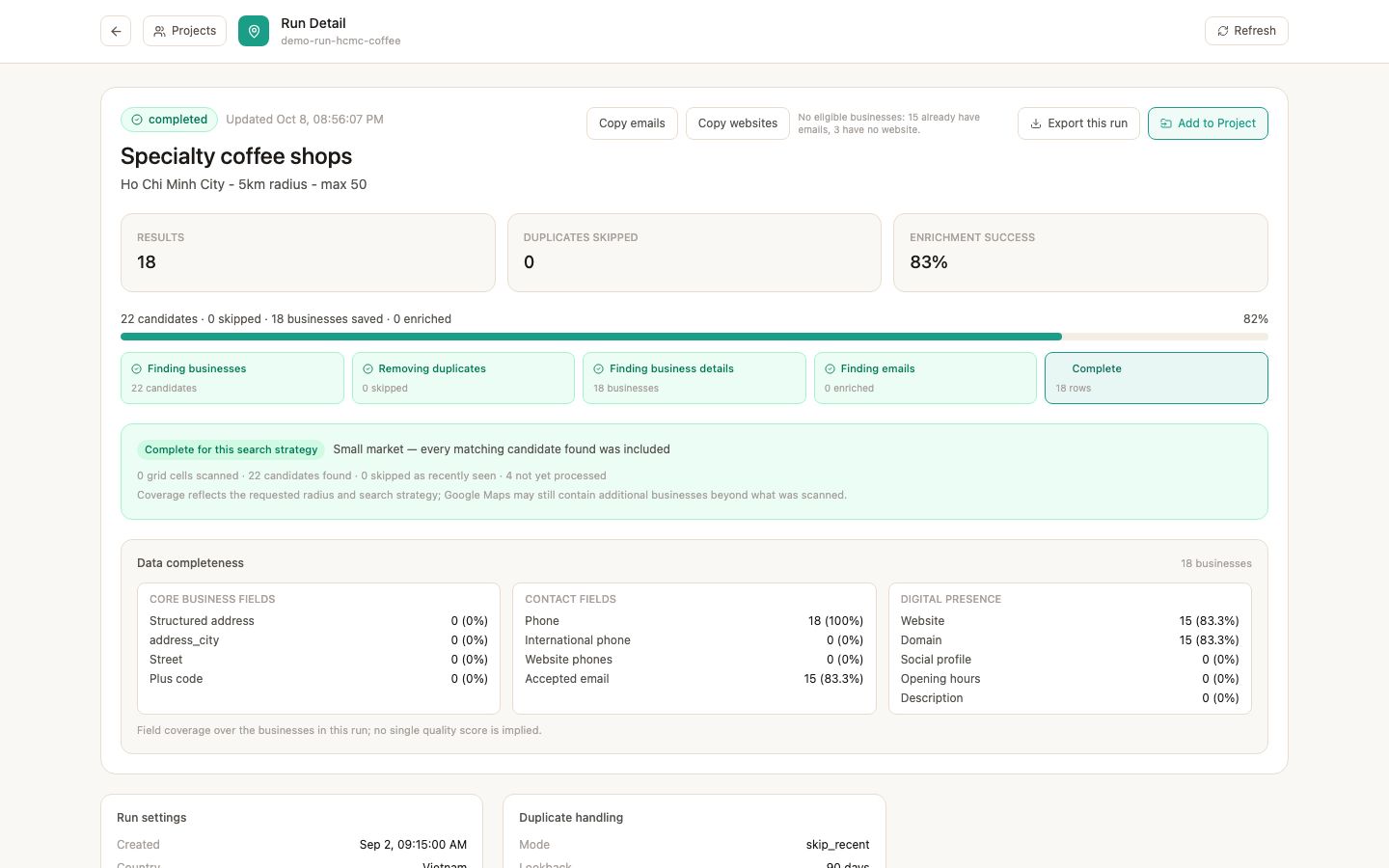
Google place id is the stable key. Two overlapping searches that find the same shop produce the same place id and must collapse to one row. Brand branches at different addresses have different place ids and stay separate - which is usually what a sales or recruitment list needs.
When you combine exports from different tools, deduplicate on place id (or CID), never on name and address text: text differs in spacing, abbreviations and language.
5. Refresh without paying twice
A monthly refresh should only add businesses that are new to your list. Use a skip-recently-seen mode with a lookback window; in Gmap Data that means a re-run saves and charges only for places you have not stored recently. Without this, every refresh pays for the same rows again.
6. Add contacts at scale, with evidence
- Run email discovery per saved business; it looks for addresses published on the business website and records where each came from.
- Expect gaps: businesses without a website usually publish no email, and that is a normal outcome.
- Enrich and verify with provider accounts you control; a catch-all domain stays unverified because existence cannot be confirmed.
- Keep suppression state: an opt-out or bounce should remove an address from future exports, not just lower its score.
Limitations to plan around
- The number of unique businesses that exist in an area is the real ceiling; a cap is a maximum, not a promise.
- Google's result ordering can change between runs, so two runs may differ at the margins.
- Result caps per run mean very large lists take several runs; plan the budget accordingly.
- Data quality varies by listing: some businesses publish very little.
Questions
Frequently asked questions
How many leads can I extract from one Google Maps search?
A single query returns a limited set, so bulk lists come from many bounded searches over a decomposed area. Gmap Data caps a city run by your account limit (up to 200 saved businesses) and a country campaign at 1,000, always limited by remaining credits.
How do I avoid duplicates in a bulk list?
Deduplicate by Google place id. Overlapping searches that find the same place collapse to one row; legitimate branches at different addresses remain separate.
How much does a bulk list cost?
With Gmap Data, one credit per saved business. Use the free lead cost calculator to estimate credits and the cheapest covering plan for any list size.
Why does a large radius return fewer businesses than expected?
Search results per query are limited, so a large radius can exhaust the cap on the most prominent businesses and under-cover the rest. Splitting the area into smaller searches usually finds more unique places.
Can I keep the list updated automatically?
Save the search as a recurring campaign and use skip-recently-seen. Only new businesses are saved and charged on each refresh.
Keep exploring
Related pages
Start with an invited account
Request access and we will help you size the first searches for your market.