Feature
Bulk Maps searches with a visible credit cap
Gmap Data searches a city at a chosen radius or walks an entire supported country as an ordered campaign, deduplicating results and capping spend before anything runs.
Runs are queued on a dedicated worker, so wide searches do not depend on a browser tab staying open.
New accounts are invite-only while we onboard early customers.
Search a city widely, or a whole country
A single Google Maps search only returns a limited set of places, so wide coverage is built from many smaller searches. Gmap Data offers two scopes for that work.
- City scope: a keyword around a point you choose, with a radius of 1 to 25 km and a result cap. The radius can be dragged on the map so the search area matches the market.
- Country scope: a managed campaign for Malaysia, Indonesia or Vietnam that walks the country as an ordered sequence of regional searches, up to 1,000 saved businesses per campaign.
- Saved searches: store the current search as a preset and reuse it for recurring campaigns.
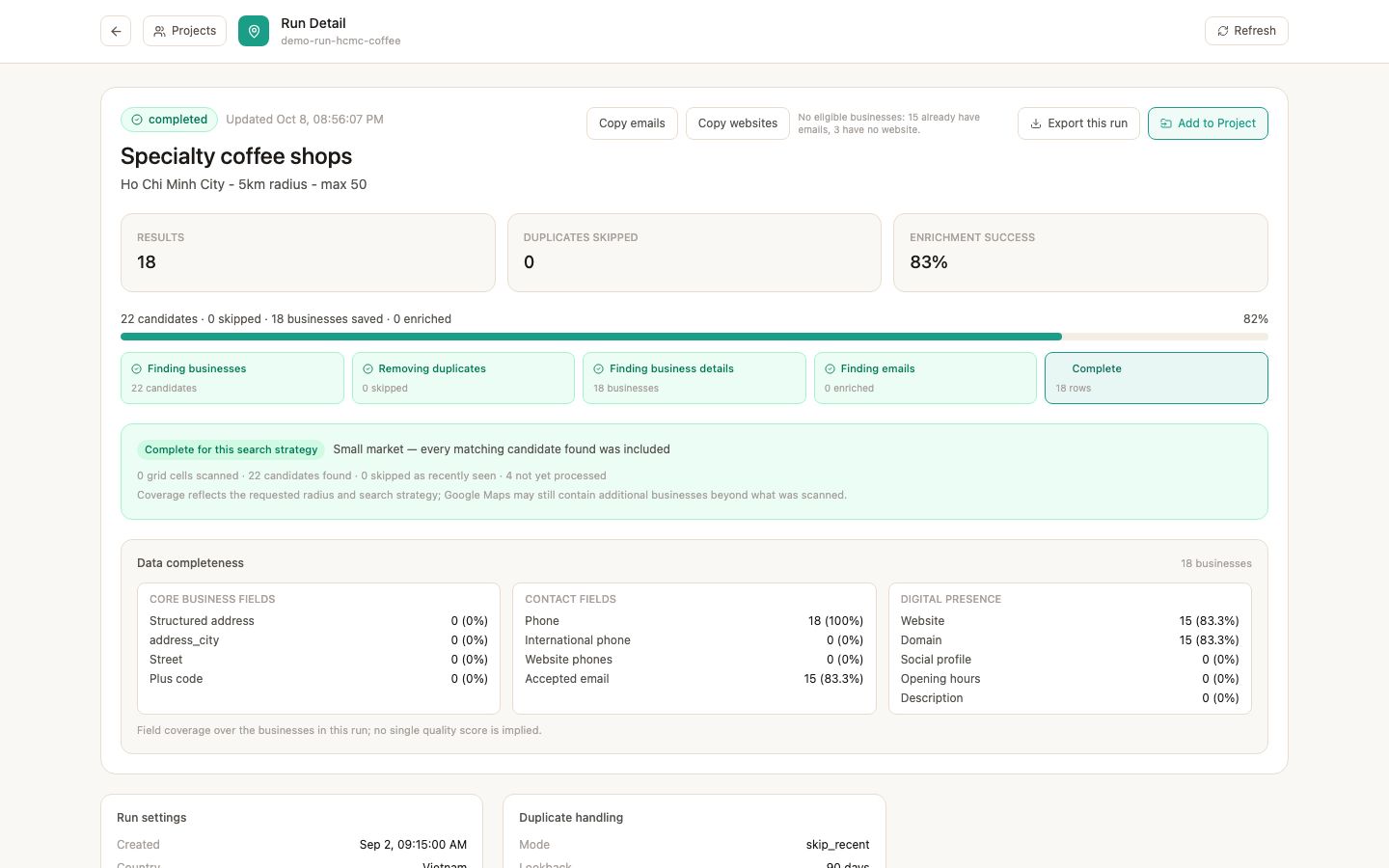
Queued, observable runs
Runs are queued and processed by a dedicated worker, so you can start a wide campaign and close the browser. Each run keeps its own diagnostics: how many candidates were seen, how many were saved, which places were skipped, and why the run stopped.
A run stops when its target is reached, the coverage is exhausted, or the credit budget you set is consumed. The completion reason is recorded and shown, so a short run is explainable rather than mysterious.
Deduplication and freshness that protect your list
Deduplication is by Google place id. Overlapping searches never produce the same business twice, and legitimate branches of one brand stay separate. A country campaign also skips results whose structured country does not match the campaign's country, so a border region does not quietly fill your list with foreign businesses.
Freshness rules let a recurring run skip places you have seen recently. Combining a saved search with a skip-recently-seen mode means a monthly refresh only saves new businesses and only charges credits for those.
You see the maximum cost before you start
The search form shows the maximum number of credits the run can consume. The effective target is capped at your remaining credit balance, so a run can never overdraw an account.
One credit is consumed per business successfully saved. Duplicates, failed lookups and pre-save rejects are free, and unused credits carry over.
Honest limits
No tool can promise a fixed number of businesses for an area. A dense city centre may exhaust the result cap quickly; a sparse region may contain fewer unique businesses than requested. Country campaigns are bounded by the manifest areas they cover.
Result counts depend on what Google returns for each search at the time it runs, and a campaign's coverage is measured against the areas it was designed to walk.
Questions
Frequently asked questions
How many businesses can one search save?
A city search is capped by your account's result limit, which the operator can set up to 200 per run. A country campaign can target up to 1,000 saved businesses and is always capped by your remaining credits.
Which countries are supported for country campaigns?
Malaysia, Indonesia and Vietnam today, each with a versioned coverage manifest. Country coverage is an additive catalogue, so more markets can be added without changing the workflow.
What happens when I do not have enough credits?
The effective target is reduced to your remaining balance before the run starts, and the form shows that maximum cost up front. A run cannot overdraw your account.
Can I run the same search again later?
Yes. Save it as a preset or recurring campaign, then use a skip-recently-seen mode to only save and pay for businesses that are new to your list.
Do I need to keep the browser open?
No. Runs are queued and executed by a dedicated worker; progress and diagnostics are available when you return.
Keep exploring
Related pages
Start with an invited account
Request access and we will help you size the first searches for your market.