Guide
How to extract Google Maps business data
Published 8 October 2026 · Gmap Data guides
Google Maps holds a detailed, public directory of local businesses. This guide explains what can be extracted, a clean workflow for doing it, and the limits you should expect before you start.
It uses the real Gmap Data workflow as the worked example, but the concepts apply to any tool built on Google's Places APIs.
New accounts are invite-only while we onboard early customers.
What extracting business data from Google Maps means
Every business on Google Maps publishes a listing: a name, a category, an address, often a phone number, sometimes a website, opening hours and a rating. Extracting that data means turning those public listings into rows you can sort, filter and export.
It does not mean opening a business and reading private information. A listing is what the business chose to publish to Maps users. The value of extracting it is scale: comparing hundreds of businesses in a market, or building an outbound list, is not practical by hand.
Before you start: three decisions
- Define the market. A query like "dental clinic" plus a place is the unit of work. The tighter the query and area, the more relevant every row is.
- Decide the budget. Credits are consumed per saved business, so the maximum list size is the number to choose before you run. Gmap Data shows the maximum cost up front.
- Decide the destination. Know whether the list is going into a spreadsheet for research, or a CRM for outreach. That determines which fields matter to you.
Step by step: a clean extraction workflow
Search a defined area
Enter a query and select a location. For a city, choose a radius that covers the market without spilling far beyond it. For a broad market, a country campaign walks the area systematically.
Set the result cap
Choose the maximum number of businesses you want to save. The cap is also limited by your remaining credits, so a run cannot overdraw the account.
Run the search
The run is queued and executed by a dedicated worker. Wide searches are split into overlapping areas and deduplicated as they go.
Review the saved rows
Check categories, addresses and statuses for obvious mismatches. Deduplication by place id means the same place is only saved once, while branches of one brand stay separate.
Enrich and export
Optionally run email discovery on the saved businesses, then export CSV to the spreadsheet or CRM you chose.
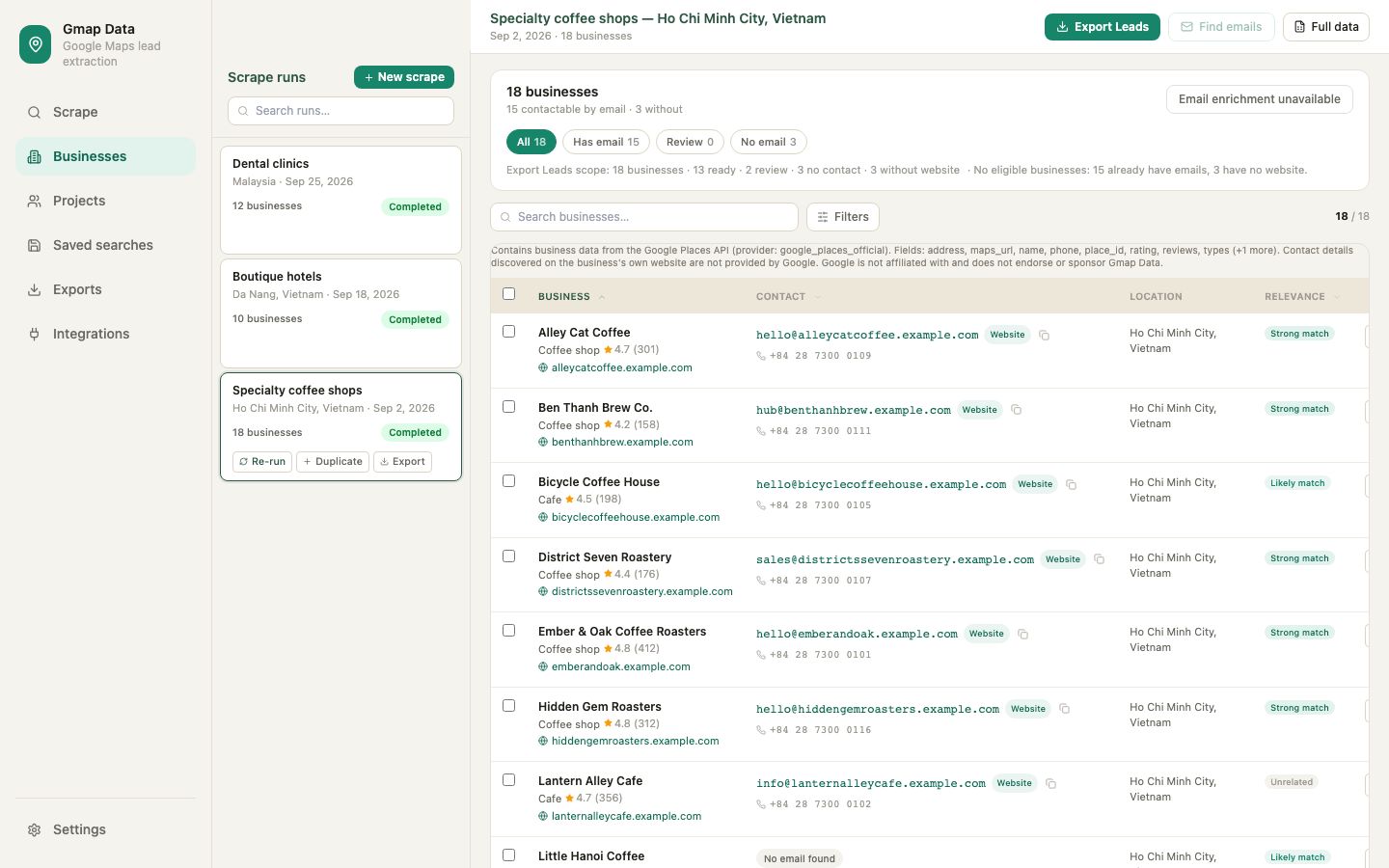
The fields you can expect
The exact fields vary by listing, but a saved business can carry all of the following. Empty cells mean the listing did not publish that field.
- Identity: business name, Google place id, Google Maps link, Google CID
- Location: full and short address, street, district, city, state, postal code, country
- Contact surface: phone numbers in national and international format, website and domain
- Profile: primary category and all categories, rating, review count, price level, business status
- Operations: opening hours, current hours and time zone
- Attributes: payment, parking and accessibility options, service-area flags, editorial summary
- Contacts: discovered emails with source, quality class and verification evidence, when enrichment has run
Common problems and what they mean
- Fewer results than the cap: the area may not contain more unique businesses for that query, or coverage is exhausted. This is a real answer, not a failure.
- Duplicate-looking rows: same brand, different address means different branches, and both are legitimate. Exact duplicates by place id are removed automatically.
- Missing phone or website: the listing does not publish it. No extraction tool can invent data that is not there.
- Changed details between runs: businesses edit listings. A monthly refresh with skip-recently-seen keeps a list current without paying for rows you already have.
- A run that stops early: the diagnostics show the recorded reason, such as reaching the target, exhausting coverage or hitting the credit cap.
Working within Google's terms and the law
Gmap Data performs searches and place lookups through Google's official Places APIs and carries the attribution notice Google requires on exported Google-derived fields.
If you build your own extraction tooling instead, review the Google Maps Platform terms before you extract, store or reuse data - the rules cover caching, derived content and display. Whichever route you take, how you use the resulting business data is your responsibility, including the outreach and privacy rules that apply in your market.
Questions
Frequently asked questions
Do I need to write code to extract Google Maps business data?
Not with Gmap Data. You define the query and area in the web app and the platform runs the searches. If you build your own tool around the Places APIs, you will need development work.
How many businesses can one extraction return?
A city search is capped by your account limit, up to 200 saved businesses per run. A country campaign can target up to 1,000 saved businesses, always limited by your remaining credits.
Why did my search return fewer businesses than I asked for?
The area may contain fewer unique businesses for that query, or coverage may be exhausted before the cap. The run diagnostics record why the search stopped.
Are duplicates charged twice?
No. Deduplication happens by Google place id before saving, and only saved businesses consume credits. Branches at different addresses are separate, legitimate rows.
How current is the data?
Every run reads what Google returns at that moment, and the run records when it happened. Re-run a saved search when you need fresher data; skip-recently-seen mode only saves businesses that are new to your list.
Keep exploring
Related pages
Start with an invited account
Request access and we will help you size the first searches for your market.